How to Use Lenslog: Track Contact Lens Replacement Dates and Stock Automatically
If you wear contacts, you have probably had the moment: was this pair opened last week or the week before? Is the solution bottle still good? Writing it on a calendar works right up until the day you forget to write it down.
Lenslog keeps track of when things need replacing and how much you have left. There is no account to create and nothing to install — it runs in your browser. Here is a walkthrough of how it works, with screenshots of the actual app.
Seeing everything at a glance
Everything you add shows up on one home screen.
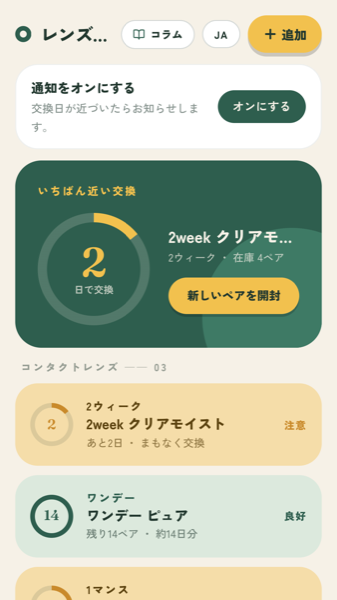
Whatever is due soonest is pulled into the card at the top
The card at the top always shows the item due soonest. If you rotate between several types of lenses, you can see what needs attention without reading the whole list.
Below that, each item is colour-coded by state:
- Good (green) — plenty of time left
- Warning (amber) — replacement date approaching, or stock running low
- Replace (red) — past due, or out of stock
Because the colour carries the message, you do not need to open the app daily and study it.
Different lens types need different tracking
What matters depends on the lens. For dailies it is how many pairs are left; for two-week and monthly lenses it is how long ago you opened the current pair. Lenslog switches its tracking method based on the type you pick.
Daily lenses: tracked by stock
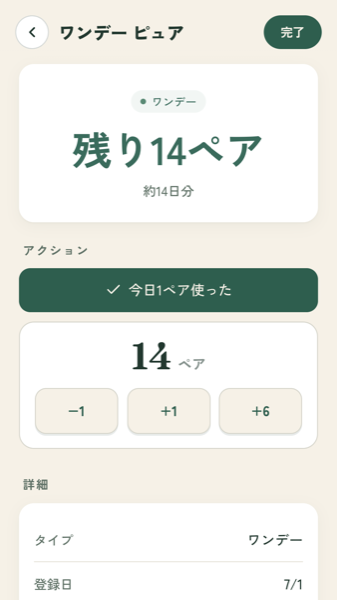
Remaining pairs, plus roughly how many days that covers
For dailies, the opening date is irrelevant — what matters is how many are left. Lenslog shows the remaining pairs and converts that into an approximate number of days, so you know when to reorder rather than discovering the box is empty.
Tap "Used one pair today" when you wear a pair. To correct the count in bulk, use the −1 / +1 / +6 buttons underneath.
Letting stock decrease automatically
If tapping a button every day sounds like something you will stop doing, turn on auto-decrease.
Set how many pairs you go through per day, and Lenslog subtracts the elapsed days each time you open it. You can set two pairs per day if your eyes take different prescriptions, and you can restrict it to specific weekdays.
If you wear glasses on days you work from home, setting Monday to Friday as your wear days keeps the count honest.
Two-week and monthly lenses: tracked by date
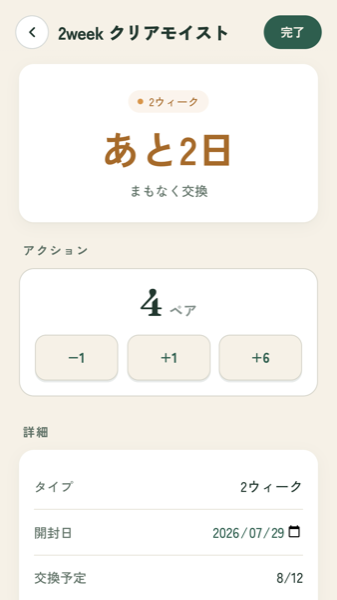
The replacement date is calculated from the opening date, with a countdown
For two-week and monthly lenses, you record the opening date and Lenslog works out the replacement date for you. It counts down — "2 days left" — so there is no arithmetic to get wrong.
When you open a fresh pair, tap "Open new pair". The opening date resets to today and your stock drops by one automatically.
If the counting itself is what trips you up, see counting two-week contact replacement dates the right way.
Solution is tracked by its post-opening expiry
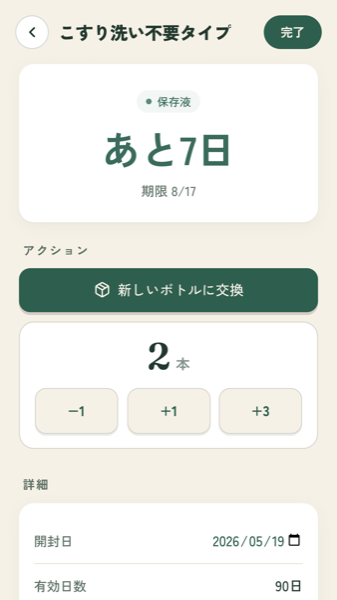
The expiry is the opening date plus the number of days the product allows
The date printed on a solution bottle is the unopened shelf life. Once opened, most products need to be used within a set window — commonly 60 to 90 days — and that is the deadline people miss.
Record the opening date and the number of days your product allows, and Lenslog calculates the expiry. You can track how many spare bottles you have too, so you notice before you run out.
There is more on this in how long contact lens solution lasts after opening.
Reminders, so you do not have to remember
An app you have to remember to open is not much help, so Lenslog can notify you.
On each item you can set how many days before the replacement date to be reminded. Set it to 0 for the day itself, or 7 for a week's warning. Give yourself more notice for things you need to reorder, and less for things you can swap immediately.
You can also set a low-stock alert — notify me when fewer than five pairs remain, for example.
To receive reminders you will need to allow notifications on your device the first time. Use the "Turn on notifications" prompt at the top of the home screen.
Where your data lives
Lenslog has no accounts and no login. The lenses and solutions you add are stored only on your device and are never sent to a server.
The one exception is reminders: if you turn notifications on, the information needed to deliver them (an anonymous device identifier plus the item names and dates you want to be reminded about) is stored on the server. No names, no email addresses, nothing that identifies you.
Because the data is local, two things follow: clearing your browser data clears your items, and there is no sync between devices.
Add it to your home screen
Choose "Add to Home Screen" from your browser menu and Lenslog launches from an icon like any other app. This works on both iPhone and Android.
- iPhone (Safari) — Share button, then Add to Home Screen
- Android (Chrome) — Menu, then Add to Home Screen
There is no install step and it takes almost no storage.
In short
- Dailies are tracked by remaining pairs; two-week and monthly lenses by replacement date
- Set your daily usage and wear days, and stock decreases on its own
- Solution is tracked by post-opening expiry and spare bottle count
- Reminder timing is configurable per item
- Free, no account, data stays on your device
The point is to stop the two failure modes: wearing lenses past their date, and running out with no spares. Start by adding the pair you are wearing right now.
This article describes how the app works. Replacement schedules vary by product — always follow the instructions supplied with your lenses and the advice of your eye care professional. If your eyes feel uncomfortable, stop wearing your lenses and seek medical advice.